
Post-production is where creative visions become deliverable reality, but it’s also where projects most commonly derail. Unclear timelines, missing handoffs, overlapping bookings, and last-minute surprises can throw even a well-run production into chaos.
A post-production schedule template helps eliminate that chaos. It gives everyone, from editors to sound designers to producers, a shared roadmap for what needs to happen and when.
By the end of this article, you’ll have practical post-production scheduling templates, plus tips to tailor them to your workflow so you can keep projects moving smoothly, on time, and without burnout.
What Is a Post-Production Schedule Template?
A post-production schedule template is a reusable structure that outlines all phases, owners, timeframes, and dependencies involved in taking a project from offline edit to final delivery. It is the foundation of effective post production scheduling.
This type of post-production schedule acts as a blueprint for post supervisors, line producers, agency producers, coordinators, and facility schedulers, anyone responsible for keeping the post pipeline flowing.
Templates are especially critical for remote and hybrid teams, where collaboration depends on shared visibility across people, departments, and locations. A strong post-production schedule template ensures everyone follows the same plan, regardless of location or time zone. When paired with advanced tools like farmerswife, a post production schedule becomes a connected system that supports alignment, transparency, and accountability across the entire pipeline.
Core Building Blocks of an Effective Post-Production Scheduling Template
Whether your team uses a spreadsheet, shared calendar, or scheduling software like farmerswife, effective post-production schedule templates all rely on the same core elements. These must-have sections are what make a post production schedule readable, usable, and realistic.
Phases & Milestones
Steps for Post-Production Scheduling begin with defining clear phases and milestones. These elements give the post production schedule its structure by outlining the major checkpoints everyone is working toward, such as Rough Cut, Picture Lock, Final Mix, QC, and Master Delivery, so progress is easy to track at a glance.
Editorial
Editorial is the foundation of any post-production schedule, especially in a film post-production schedule template, and this is where the farmerswife API plays a critical role. By linking editorial systems with scheduling and media management tools, tasks such as ingest, assembly, rough and final cuts, conform, and turnovers are clearly defined and automatically reflected across the schedule. If editorial is unclear or disconnected, post-production scheduling across all departments quickly breaks down.
Tasks
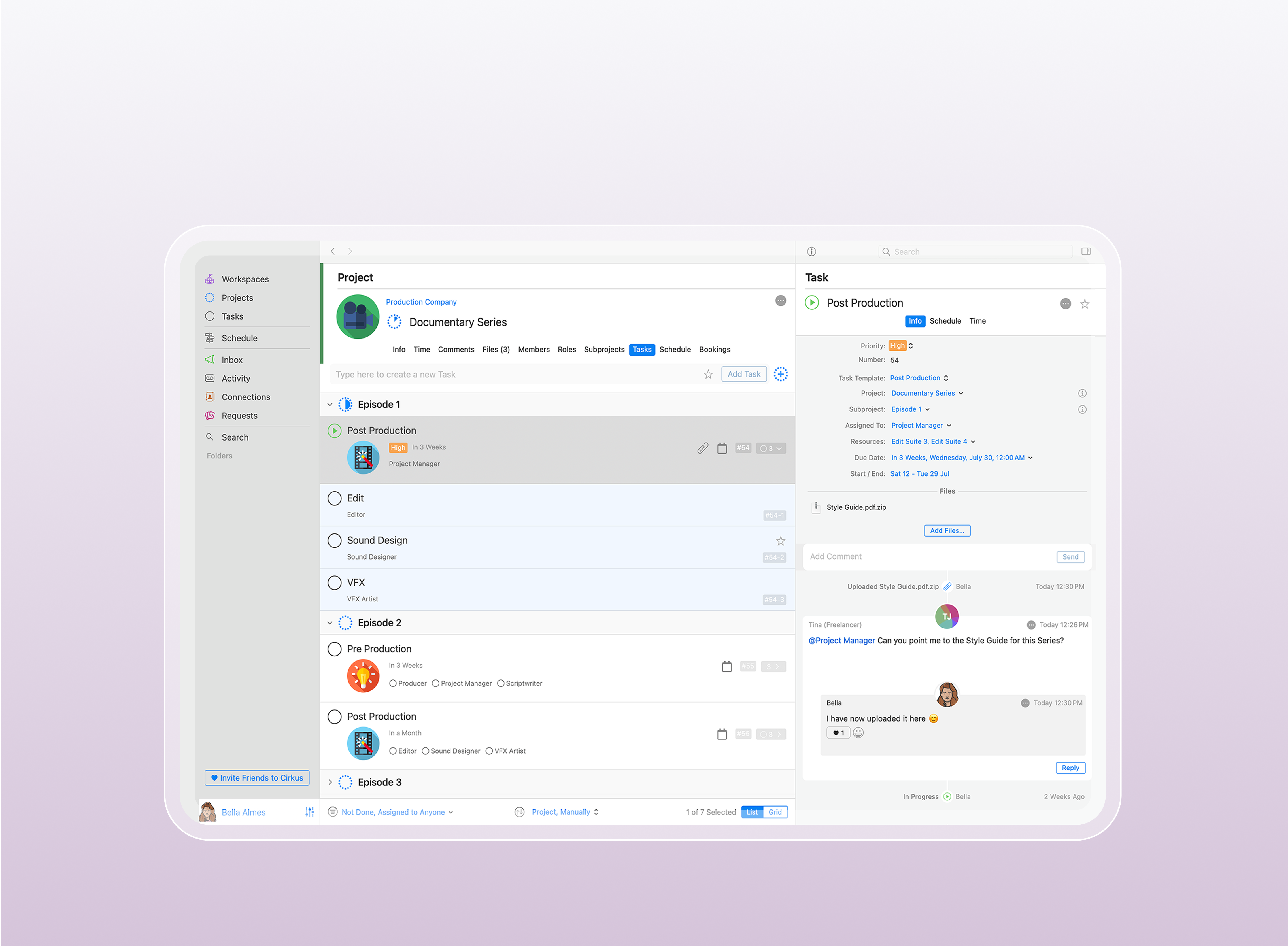
Every phase in a post-production schedule template should be broken down into clearly defined tasks with start dates, end dates, descriptions, and assigned owners. This level of detail transforms post-production scheduling from a high-level wish list into a truly actionable plan. Using a tool like Cirkus to maintain a clear overview of tasks and progress gives teams greater visibility, accountability, and control throughout the production process.
Owners & Dependencies
A usable schedule makes responsibility visible. Every task should have a clearly assigned owner, and dependencies should show what must happen first. For example, VFX work can’t begin until the cut reaches a defined stage, and final sound can’t start until picture lock.
Sound
Sound work often overlaps with editorial, so it must be clearly mapped. Typical tasks include dialogue edit, sound design, ADR, temp mix, and final mix. Showing overlaps helps teams avoid conflicts and delays.
VFX
VFX schedules should track shot pulls, vendor work, reviews, approvals, and final deliveries. Breaking VFX into stages makes progress visible and keeps reviews from becoming bottlenecks.
Color
Color workflows usually include conform, color pass, client review, and final grade. Because color happens late in the process, accurate scheduling here is critical to protect delivery dates.
Finishing & Delivery
Finishing and delivery bring the post production schedule to completion. Online, graphics, QC, master creation, and delivery milestones must be clearly planned to avoid last-minute rushes that can derail delivery.
Resources: People, Rooms & Equipment
A practical post production schedule also tracks resources, who is working, where, and with what. This is where Resource Management Solutions become critical. Editors, mix stages, color rooms, and review spaces all need to be accounted for in the schedule. Without proper resource management, even the best post production schedule templates quickly fall apart due to conflicts, double-bookings, and overbooking.

Post-Production Scheduling Template Examples
Different types of post-production projects require different scheduling approaches. While the core scheduling elements stay the same, the structure and timing of a schedule will vary depending on whether you’re working on a feature film, a commercial, or a social-first campaign.
Feature Film / Episodic Series Template
A film post-production schedule template or episodic schedule is typically long and complex. These post-production schedules are broken into phases like Editorial, VFX, Sound, Color, and Final Delivery, with milestones such as “Picture Lock by Week 6.”
Editorial drives the schedule, while VFX overlaps early and continues through multiple review cycles. Sound and color follow picture lock, leading into QC and Master Delivery. To support this level of complexity, Equipment Tracking for Post-Production becomes essential, ensuring that edit suites, sound stages, color rooms, and shared gear are available when needed. This type of post-production schedule template emphasizes overlapping work, long lead times, milestone discipline, and clear equipment visibility across departments.
Commercial / Branded Content Template
Commercial and branded content schedules are much shorter, often just one to three weeks. The focus is on speed and efficiency, with many tasks happening in parallel. Editorial moves quickly from rough cut to picture lock, while sound, mix, and color are often scheduled at the same time. Clear review cycles and fast approvals are critical to keeping delivery on track.
Social / Digital-Only Campaign Template
Social and digital-only campaigns usually involve multiple assets and versions. The key challenge is managing volume while maintaining shared deadlines. A strong template separates global milestones, such as asset approval and final delivery, from repeatable per-asset tasks like edit, graphics, sound, review, and exporting multiple formats. This approach makes it easier to scale production without losing clarity.
How to Build or Customize a Post-Production Schedule Template
Below is a practical framework you can use to build a post-production schedule template from scratch or customize an existing template in tools like farmerswife. Each step focuses on making the schedule realistic, flexible, and usable in day-to-day production.
Step 1: Start from the Delivery Date and Work Backwards
The most effective way to build a post-production schedule is to begin with the final delivery date or key deadline. By working backwards, you ensure that every phase of post production has enough time and that nothing critical is left until the last minute. This reverse-engineering approach aligns the entire schedule around the project’s end goal and sets a clear foundation for all tasks that follow.
Step 2: Map Phases and Parallel Work
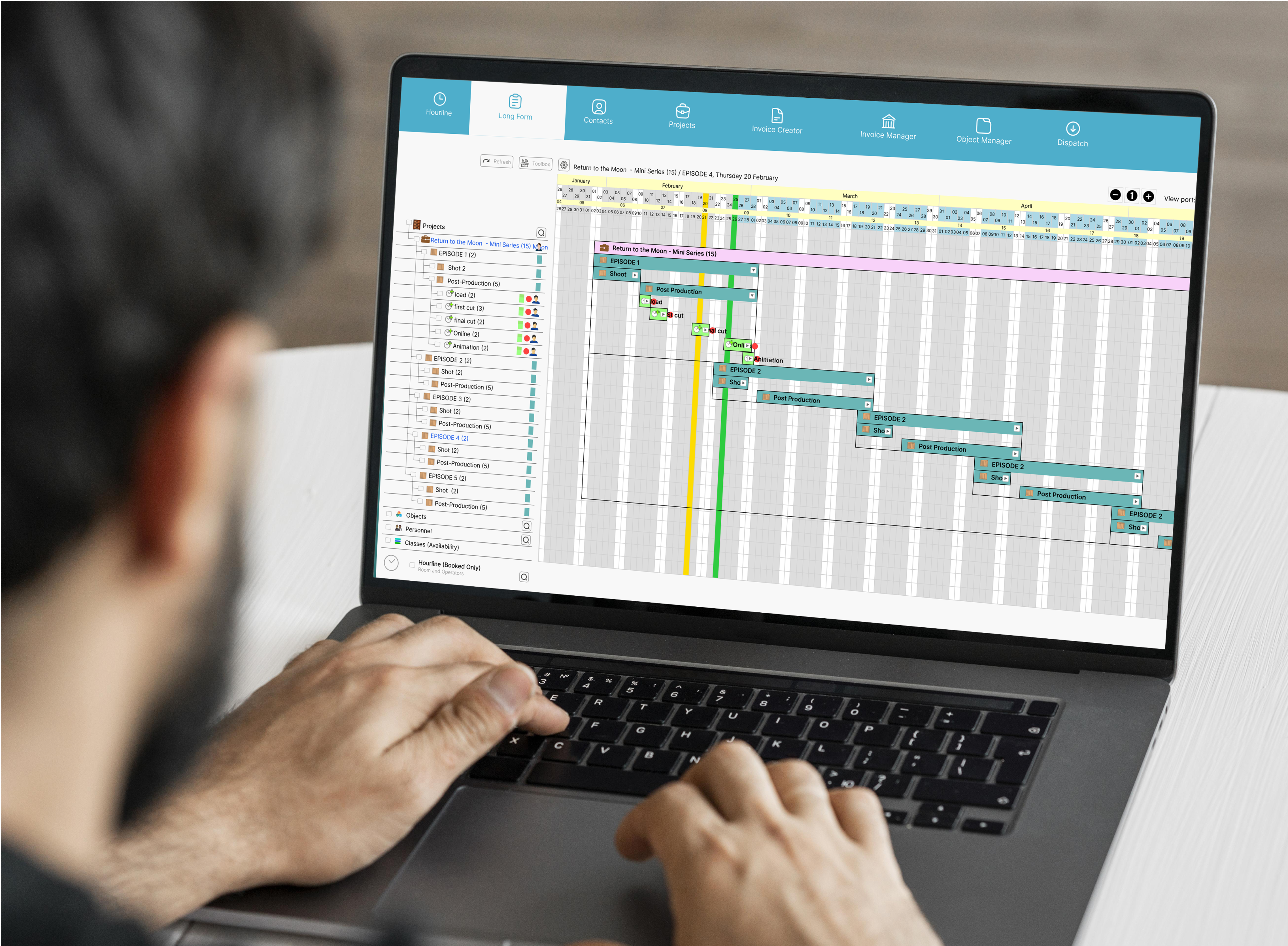
Once the delivery date is set, divide the project into clear phases such as Editorial, VFX, Sound, Color, and Finishing. Not all tasks need to happen sequentially, many can run in parallel. Mapping where work can overlap helps teams move faster, reduces downtime, and makes dependencies easier to understand. Visual timelines, like those in farmerswife, are especially useful for spotting overlaps and planning efficiently.
Step 3: Estimate Durations and Buffers
Assign realistic durations to each task based on past experience or similar projects. Just as important, build in buffers for feedback rounds, rendering time, technical issues, or unexpected revisions. These buffers protect both the schedule and the team, helping avoid burnout and last-minute chaos.
Step 4: Assign Resources and Avoid Conflicts
A strong post-production schedule doesn’t just track projects, it tracks resources. Each project should clearly show which people, rooms, and equipment are required. This makes it easier to spot conflicts early, such as two editors needing the same suite or a colorist booked on multiple projects. Proper resource planning prevents issues before they disrupt the timeline.
.png?width=1098&height=947&name=Screenshot%202026-01-27%20at%2013.59.16%20(2).png)
Step 5: Build in Review Cycles and Feedback Loops
Reviews and approvals are a core part of post-production and should be scheduled as dedicated tasks. Each review cycle needs a clear owner, deadline, and time allocated for revisions. Planning feedback loops in advance leads to smoother approvals and reduces the risk of delays late in the process.
Step 6: Set Up Status Tracking and Reporting
Finally, the schedule should support real-time tracking. Assigning status updates to tasks helps teams understand what’s on track, what’s falling behind, and where attention is needed. For producers and supervisors, this visibility is essential for making informed decisions and keeping the project moving forward.
Best Practices to Keep Your Post-Production Schedule on Track
Below is a practical framework you can use to build a post-production schedule from scratch or customize an existing template using the best post-production scheduling software. Each step focuses on making the post production schedule realistic, flexible, and usable in day-to-day production.
-
Use One Source of Truth for Post-Production Scheduling
Keep all scheduling information in a single system instead of spreading it across spreadsheets, emails, and calendars. A centralized schedule reduces confusion, prevents version conflicts, and ensures everyone is working from the same, up-to-date plan. -
Review the Schedule Regularly With Your Team
Schedule regular check-ins to review progress and upcoming tasks. These touchpoints help align expectations, surface risks early, and allow the team to adjust before small issues become major delays. -
Track Real Data and Refine Templates Over Time
Use actual project data to improve your templates. Comparing planned timelines with real-world durations helps you create more accurate schedules over time, while team feedback ensures the template continues to reflect how work actually gets done.
Common Scheduling Pitfalls and How to Avoid Them
Production Scheduling for Filmmakers doesn’t end when shooting wraps. Post-production scheduling is complex, and even the most carefully planned timelines can break down if common pitfalls aren’t addressed. While every project comes with its own challenges, there are a few recurring issues that regularly disrupt post-production workflows.
-
-
Underestimating Task Durations
One of the most common mistakes is assuming tasks will take less time than they realistically do. To avoid this, base timelines on historical data from similar projects and build in buffers for revisions, rendering, and unexpected issues. -
Ignoring Feedback and Review Cycles
Reviews are often treated as informal steps, which leads to delays. Instead, schedule review and approval rounds as dedicated tasks with clear deadlines and owners, ensuring feedback doesn’t derail the timeline. -
Overbooking People and Resources
Double-booking editors, rooms, or equipment creates bottlenecks and frustration. Assign resources at the task level and use scheduling tools to identify conflicts before they impact production. -
Not Updating the Schedule Regularly
A schedule quickly loses value if it isn’t kept current. Regular reviews, daily on fast-moving projects or weekly on longer ones, help teams adapt to changes and stay aligned. -
Failing to Communicate Changes Effectively
Schedule changes are inevitable, but poor communication causes confusion. When timelines shift, notify all affected team members immediately so everyone can adjust their work accordingly.
-
farmerswife Post-Production Templates Help You Go Beyond Spreadsheets
Spreadsheets and shared calendars often fall short when faced with the complexity of modern post-production. As projects scale and teams expand across multiple shows, clients, and delivery dates, manual updates, resource conflicts, version control issues, and limited real-time visibility quickly become major pain points. These tools simply aren’t built to handle overlapping workflows, fast-changing timelines, and shared resources across multiple projects and facilities.
This is where farmerswife comes in. Designed specifically for media and post-production teams, farmerswife combines dynamic schedule templates with automated resource management, real-time status tracking, and integrated reporting, so you always have a single, reliable source of truth. Visual timelines and built-in conflict alerts make it easy to see who and what is booked, spot clashes early, and resolve issues before they impact delivery.
With farmerswife, post-production scheduling becomes smoother, smarter, and more scalable. Whether you’re managing a single campaign or an entire slate of features, series, and versions.