---
title: What Is a Workstream in Project Management? Definition & Benefits
description: What is a workstream in project management? Learn its definition, key benefits, and best practices to improve project efficiency and team collaboration.
image: https://blog.farmerswife.com/hubfs/pexels-vojtech-okenka-127162-392018.jpg
---
[Skip to content](https://blog.farmerswife.com/what-is-workstream#main-content)
[farmerswife ](https://farmerswife.com/)
Open main menu
Products
farmerswife
Manage your Resources and Projects with our advanced production scheduling software
[Scheduling Software](https://farmerswife.com/scheduling/)
Manage projects and resources with ease
[Project Management Software](https://farmerswife.com/project-management/)
Track schedules, costs and budgets, all in one place
[Financial Reporting](https://farmerswife.com/project-financials/)
Full financial control, from quote to invoice
Cirkus
Enhance your team’s productivity with Cirkus a collaborative project management software
[Team Collaboration Tool](https://farmerswife.com/team-collaboration-tool-cirkus/)
Enhance your team’s productivity and communication
[Task Management](https://farmerswife.com/task-management-software-cirkus/)
Assign tasks, set deadlines, and keep track of tasks effortlessly
[Resource Management](https://farmerswife.com/resource-scheduling-software-cirkus/)
Manage all your resources to keep projects on track
Workflows
[Post Production Software](https://farmerswife.com/post-production/)
Schedule projects and resources for smooth post workflows
[Education Management Solution](https://farmerswife.com/education/)
Manage staff, rooms, and gear across departments
[Broadcast Management Software](https://farmerswife.com/broadcasting/)
All-in-one scheduling and resource control for broadcast
[Studio Management Software](https://farmerswife.com/audio-production/)
Complete scheduling for audio studios, track every detail
[Equipment Rental Software](https://farmerswife.com/equipment-rental/)
Manage all gear and jobs in one streamlined tool
[Production Management Software](https://farmerswife.com/production/)
Handle budgets, schedules, and delivery from one place
Resources
[Success Stories](https://farmerswife.com/success-stories/)
See how our customers succeed with farmerswife and Cirkus
[Support & Consultancy](https://farmerswife.com/support/)
Meet our team of media experts!
[farmerswife Pricing](https://farmerswife.com/pricing/)
Dive into our pricing. Get in touch for a tailored quote
[Webinars](https://farmerswife.com/webinars/)
Explore key features and best practices in our webinars
[Cirkus Video Tutorials](https://cirkus.com/tutorials-how-to-use-our-task-management-app/)
Get up to speed with quick, easy Cirkus tutorials
[Cirkus Pricing](https://cirkus.com/pricing/)
Explore flexible pricing options for Cirkus
Support
[farmerswife Blog](https://blog.farmerswife.com/)
Articles, updates, and release news
[farmerswife Knowledge Base](https://support.farmerswife.com/support/home)
Explore guides to get the most from farmerswife
[farmerswife Installers](https://farmerswife.com/installers/)
Download the latest versions here
[Cirkus Blog](https://cirkus.com/blog/)
Blog and insights from Cirkus team
[Cirkus Knowledge Base](https://support.cirkus.com/support/home)
Explore guides to get the most from Cirkus
[FAQs](https://farmerswife.com/faqs/)
Your Questions Answered!
[Book a demo](https://farmerswife.com/contact-us/)
farmerswife 
Close menu
Products
farmerswife
[Scheduling Software](https://farmerswife.com/scheduling/) [Project Management Software](https://farmerswife.com/project-management/) [Financial Reporting](https://farmerswife.com/project-financials/)
Cirkus
[Team Collaboration Tool](https://farmerswife.com/team-collaboration-tool-cirkus/) [Task Management](https://farmerswife.com/task-management-software-cirkus/) [Resource Management](https://farmerswife.com/resource-scheduling-software-cirkus/)
Workflows
[Post Production Software](https://farmerswife.com/post-production/) [Education Management Solution](https://farmerswife.com/education/) [Broadcast Management Software](https://farmerswife.com/broadcasting/) [Studio Management Software](https://farmerswife.com/audio-production/) [Equipment Rental Software](https://farmerswife.com/equipment-rental/) [Production Management Software](https://farmerswife.com/production/)
Resources
[Success Stories](https://farmerswife.com/success-stories/) [Support & Consultancy](https://farmerswife.com/support/) [farmerswife Pricing](https://farmerswife.com/pricing/) [Webinars](https://farmerswife.com/webinars/) [Cirkus Video Tutorials](https://cirkus.com/tutorials-how-to-use-our-task-management-app/) [Cirkus Pricing](https://cirkus.com/pricing/)
Support
[farmerswife Blog](https://blog.farmerswife.com/) [farmerswife Knowledge Base](https://support.farmerswife.com/support/home) [farmerswife Installers](https://farmerswife.com/installers/) [Cirkus Blog](https://cirkus.com/blog/) [Cirkus Knowledge Base](https://support.cirkus.com/support/home) [FAQs](https://farmerswife.com/faqs/)
[Book a demo](https://farmerswife.com/contact-us/)
# What Is a Workstream in Project Management? Definition & Benefits
Posted by [Carla Molina Whyte](https://blog.farmerswife.com/author/carla-molina-whyte) on June 25, 2026
[Book a Personalised Demo](https://farmerswife.com/contact-us/)
A workstream in project management is a group of related tasks that contributes to one part of a larger project. It helps teams divide complex work into clear ownership areas, improve coordination, and track progress across parallel activities. Workstreams are especially useful in industries like media production, software, and marketing where multiple teams work at the same time.
## What Is a Work Stream in Project Management?
A workstream is a structured group of related tasks, people, resources, and deliverables that support a specific part of a project. It helps teams manage complex projects by dividing work into clear, trackable sections.
In simple terms, a workstream answers: “Who is doing what, and what are they responsible for delivering?”
A typical workstream definition project management setup includes clear ownership, timelines, and dependencies between tasks.
### What Makes Up a Workstream?
A workstream typically includes several connected components that help teams stay aligned:
- Objective: What the workstream is trying to achieve
- Owner: The person or team responsible for delivery
- Tasks: Individual activities required to complete the work
- Dependencies: Other teams or workstreams it relies on
- Timeline: Start and end dates for delivery
- Resources: People, tools, and systems such as resource allocation
- Deliverable: The final output or result of the workstream
In modernproject management software, these elements are tracked in real time to avoid duplication and delays.
## Why Are Workstreams Important in Project Management?
Workstreams are important because they allow teams to run complex projects in parallel without losing structure or control. Instead of managing one large workflow, project managers can separate work into clear ownership areas.
They help improve:
- Visibility across multiple teams and tasks
- Ownership clarity and accountability
- Resource planning and workload balance
- Dependency tracking between teams
- Faster delivery through parallel execution
According to PMI Pulse of the Profession 2024, organisations using structured project approaches achieve a 73.8% project performance rate and a 57% increase in hybrid project delivery models.
Workstreams are especially useful in environments like media production, where scheduling, editing, approvals, and delivery often happen at the same time across different teams.
## Workstream Examples Across Marketing, Software, and Media Production
Workstreams are used across industries to organize complex projects into manageable, goal-driven segments. Below are practical workstream examples that show how this approach is applied in real-world project management.
### **Marketing Workstream**
A marketing workstream focuses on campaign planning and execution. It typically includes content creation, design, approvals, and publishing. The marketing manager usually owns this workstream, and the final deliverable is a fully launched campaign across channels.
### **Software Workstream**
A software workstream covers development activities such as backend coding, frontend design, testing, and deployment. The tech lead or engineering manager owns it, ensuring the product is delivered according to specifications.
### **Media Production Workstream**
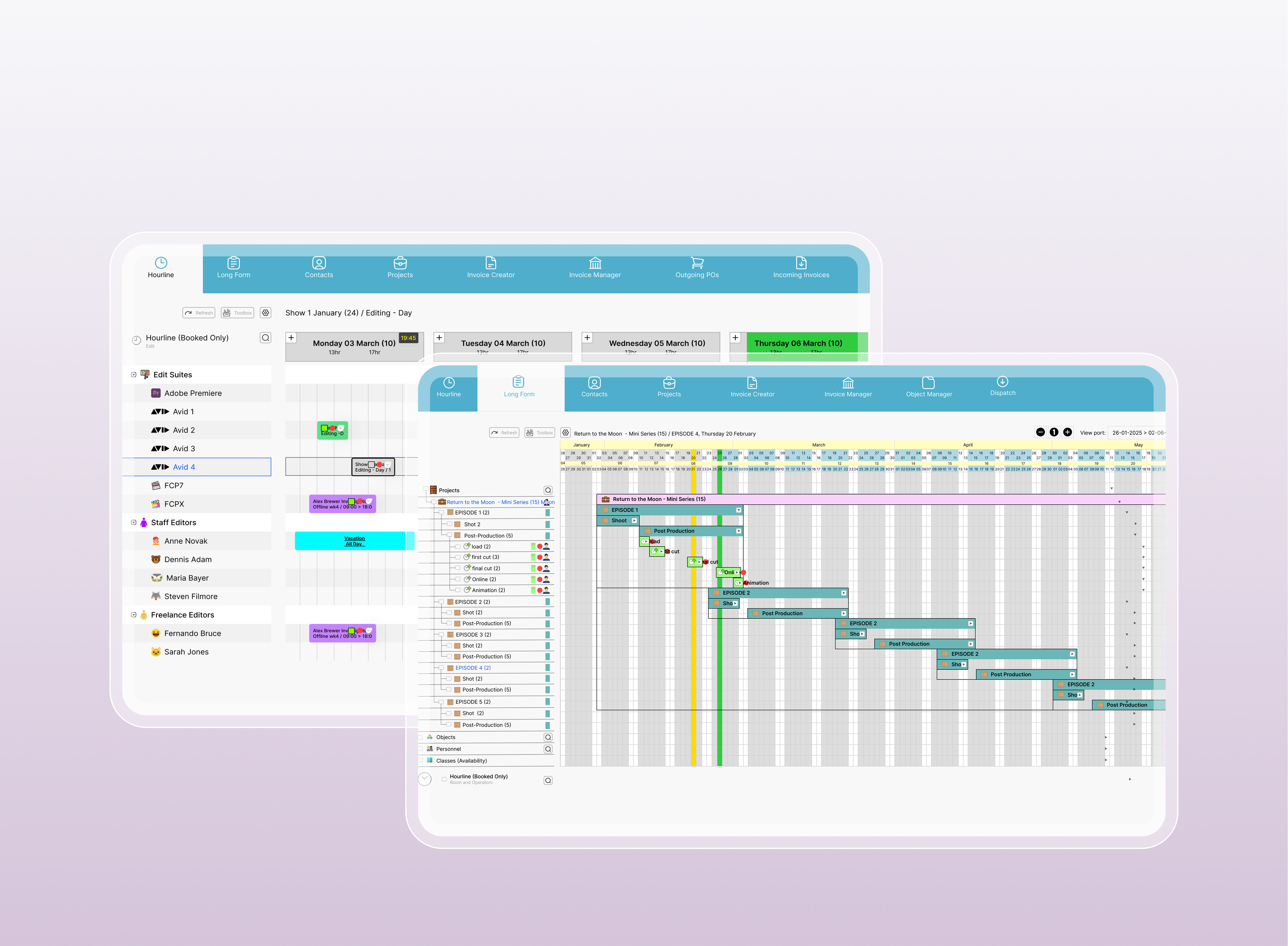
In media production, workstreams are essential for managing complex timelines. One workstream may cover scheduling and planning, another editing and post-production, and another final delivery. Production managers use tools like[farmerswife](https://farmerswife.com/) and[Cirkus](https://www.cirkus.com/) to maintain visibility across all parallel workstreams and ensure nothing is delayed or duplicated.
This structure is especially useful in broadcast and post-production teams where multiple deadlines and assets move simultaneously.
## Types of Workstreams in Project Management
Understanding the different types of workstreams is essential for project managers to effectively structure their projects and [resource allocation](https://blog.farmerswife.com/what-is-resource-management). Let's explore the various types of workstreams in project management and how they contribute to project success:
- ### **Technical Workstream**
A technical workstream includes system development, infrastructure setup, and engineering tasks. It is commonly used in software and IT projects where technical execution is required.
- ### **Functional Workstream**
A functional workstream is based on business departments such as marketing, finance, operations, or HR. Each department manages its own deliverables within the wider project.
- ### **Stakeholder Workstream**
A stakeholder workstream focuses on communication, approvals, and feedback loops with clients or external stakeholders. It ensures alignment before final delivery.
- ### **Geography-Based Workstream**
A geography-based workstream is used when projects are spread across multiple locations or regions. It helps manage local teams while maintaining global consistency.
- ### **Time-Oriented Workstream**
A time-oriented workstream is structured around phases, sprints, or deadlines. It is closely related to[agile project management](https://blog.farmerswife.com/agile-methodology-in-project-managment), where work is delivered in short cycles with continuous updates.
## Workstreams in Agile Project Management
In Agile project management, workstreams help organize and prioritize tasks in small, manageable segments called sprints. Each workstream focuses on specific features or tasks, allowing teams to work independently while contributing to the overall project. This approach aligns with Agile’s principles of flexibility, rapid adaptation, and continuous improvement. Workstreams enhance collaboration, ensure efficient workflows, and allow teams to adjust quickly to feedback or changing priorities.
## Workstream vs Workflow: What’s the Difference?
While workstreams represent a series of tasks aimed at achieving a particular goal, workflows refer to the sequence of steps involved in completing a specific task or process within a workstream. In essence, workflows are a subset of workstreams, detailing the procedural aspects of individual tasks.
| **Aspect** | **Workstream (Project-Level)** | **Workflow (Task-Level)** |
| --- | --- | --- |
| **Definition** | A series of tasks aligned to a larger project goal. | A sequence of steps to complete a specific task or process. |
| **Scope** | Broader scope – covers a significant phase or functional area of a project. | Narrow scope – focuses on one detailed process or activity. |
| **Focus** | High-level outcomes and objectives for that portion of the project. | Step-by-step execution of a particular procedure or task. |
| **Example** | *Marketing workstream* (oversees all marketing efforts in a project). | *Content approval workflow* (the steps to review and approve one content piece). |
| **Dependency** | Often interdependent with other workstreams (e.g. the Marketing workstream might depend on outputs from the Product Development workstream). | Usually self-contained within a workstream (tasks in a workflow contribute to that workstream’s output). |
## Key Benefits of Workstreams in Project Management
Workstreams in project management improve how teams structure, execute, and track complex projects by breaking work into clear, manageable parts. This creates better visibility, stronger coordination, and more predictable delivery across multiple teams.
### **Streamlined Project Execution**
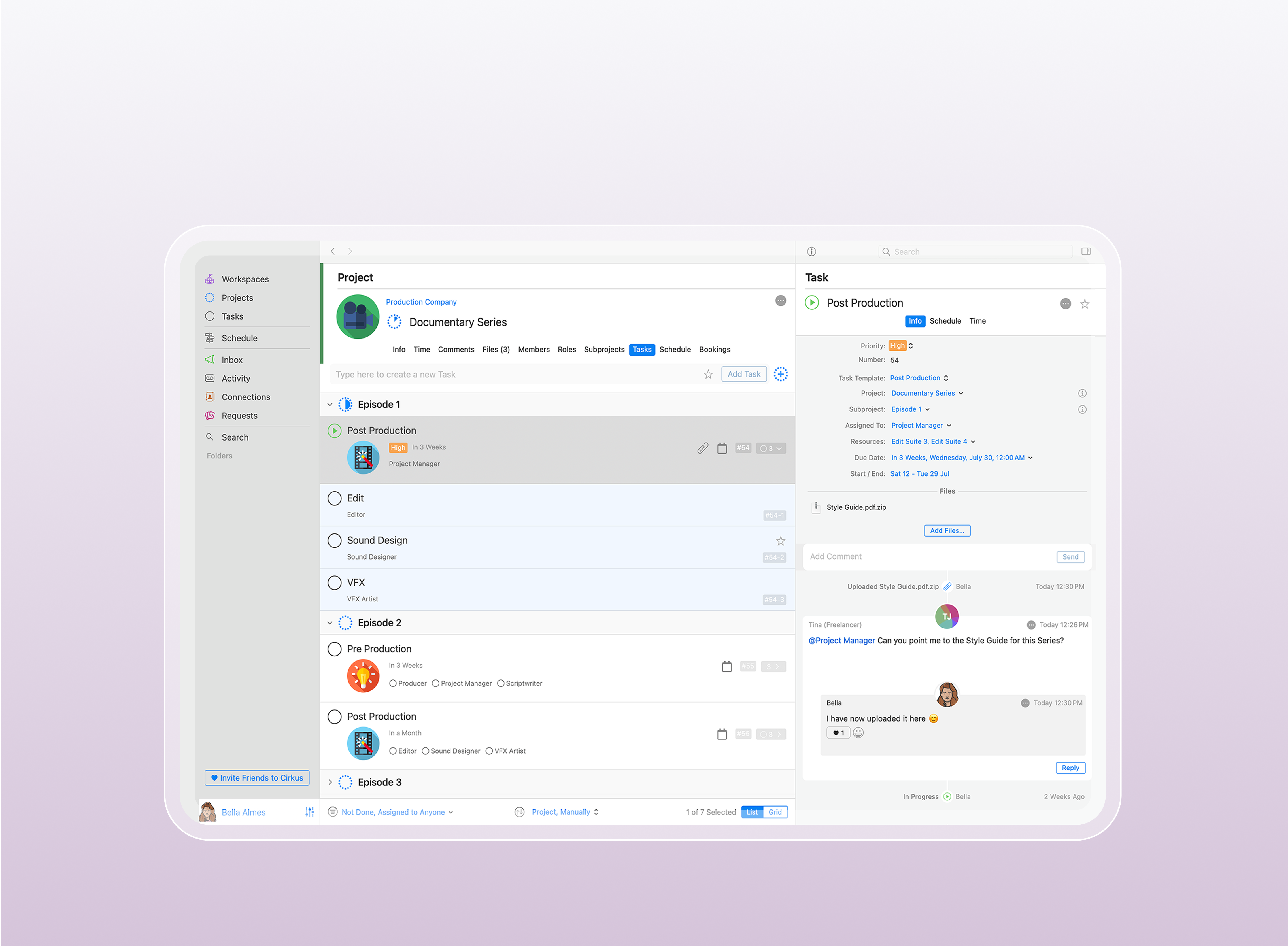
Workstreams simplify project delivery by dividing large initiatives into smaller, focused units of work. This reduces bottlenecks, avoids duplicated effort, and helps tasks move smoothly from planning to execution.
Teams using structured tools such as [Cirkus](https://www.cirkus.com/) can centralize tasks, improve collaboration, and maintain clarity across all workstreams.
### **Better Resource Allocation**
Workstreams improve how teams assign people, time, and tools across a project. Instead of competing priorities, resources are distributed based on clear ownership and workload visibility.
This supports more efficient planning in workstream management and improves overall project performance when using structured project management systems such as [project management](https://farmerswife.com/project-management/).
### **Increased Agility in Delivery**
Workstreams allow teams to adjust priorities within specific areas of a project without disrupting the entire workflow. This makes it easier to respond to changes, feedback, or shifting deadlines.
It is especially useful in agile and hybrid environments where fast iteration and continuous updates are required.
**Improved Workflow Efficiency and Automation**
Workstreams often integrate with automation tools to reduce manual work and improve consistency. This speeds up repetitive processes and reduces the risk of human error.
It also clarifies the difference in workflow vs workstream, where workflows handle step-by-step execution while workstreams manage broader project structure.
### **Stronger Ownership and Accountability**
Each workstream has a clearly defined owner responsible for outcomes, timelines, and deliverables. This removes ambiguity and improves accountability across teams.
Clear ownership also strengthens coordination in complex workstream management setups where multiple teams work in parallel.
### **Greater Transparency Across Projects**
Workstreams improve visibility across all project activities, allowing teams and stakeholders to track progress in real time.
This transparency helps identify delays early and supports faster, more informed decision-making.
### **Reduced Risk Through Better Planning**
By mapping dependencies and tracking progress at the workstream level, teams can identify risks early and take corrective action before issues escalate.
This improves project stability and reduces the impact of delays across interconnected workstreams.
## Best Practices for Workstream Management
Effective workstream management in project management requires clear structure, coordination, and consistent tracking across all workstreams. When teams work in parallel, these practices help reduce delays, improve alignment, and avoid resource conflicts.
### **Define Workstreams Clearly**
Each workstream should have a clear purpose, scope, and deliverables so teams understand their responsibilities and how they contribute to the overall project. This improves alignment and strengthens coordination in workstream project management.
### **Monitor Progress with Consistent Controls**
Ongoing tracking ensures each workstream stays aligned with milestones, timelines, and KPIs. Using structured project management improves visibility and supports better control of complex projects.
### **Map Dependencies Across Workstreams**
Workstreams are often interconnected, so mapping dependencies early helps teams understand how one workstream impacts another. This reduces bottlenecks and improves execution, especially when using workflow vs workstream structures for layered project planning.
### **Strengthen Communication Across Teams**
Clear communication is essential for effective workstream management. Tools like Cirkus support real-time collaboration, updates, and coordination across teams working on parallel workstreams.
### **Visualize and Document Workstreams**
Workstreams should be visualized using timelines, dashboards, or structured boards to improve clarity and tracking. This is especially important in production-heavy environments where multiple deliverables move through different stages.
### **Integrate Workstreams with Project Systems**
Workstreams must be connected to the wider project structure to maintain consistency and avoid duplication. Many teams use farmerswife to manage scheduling, resource allocation, and tracking across all workstreams. For more structured planning approaches, see[project management for creative teams](https://blog.farmerswife.com/guide-to-project-management-for-creatives?utm_source=chatgpt.com) andagile project management
## How farmerswife Supports Workstream Management in Project Planning
Managing multiple workstreams becomes difficult as projects scale. Teams often lose visibility, overload resources, or miss dependencies.
farmerswife helps teams manage workstreams by bringing scheduling, resource allocation, budgeting, and project tracking into one system. It supports parallel workstreams without losing control or clarity.
For teams looking to improve coordination and visibility, explore project management software or [book your demo](https://farmerswife.com/contact-us/) to see how structured workstream planning improves delivery.
## **FAQ About Workstreams in Project Management**
### **What is a workstream in simple terms?**
A workstream is a group of related tasks that contribute to one part of a larger project, with clear ownership and deliverables.
### **What is an example of a workstream?**
A marketing campaign, software release, or post-production editing process can all be workstreams depending on project structure.
### **What is the difference between workflow and workstream?**
A workstream defines what area of work is being done, while a workflow defines the step-by-step process used to complete it.
### **Who owns a workstream?**
A workstream is usually owned by a project manager, team lead, or department head responsible for delivering results.
### **How do you manage multiple workstreams at the same time?**
Teams use project management software like farmerswife or Cirkus to track timelines, resources, and dependencies across parallel workstreams.
Topics: [works-stream](https://blog.farmerswife.com/topic/works-stream)
---

[Carla Molina Whyte](https://blog.farmerswife.com/author/carla-molina-whyte)
Carla is a Spain-based marketing professional with expertise in digital marketing, social media, and email campaigns. With a Film and Media background, she blends storytelling and strategy to craft impactful content.
[](https://www.linkedin.com/in/carla-molina-whyte-b7ab8019b/)
---
## Footer Sitemap
Resources
- [Success Stories](https://farmerswife.com/success-stories/)
- [Webinars](https://farmerswife.com/webinars/)
- [Support](https://farmerswife.com/support/)
- [Video Tutorials](https://support.farmerswife.com/support/solutions/17000078085)
- [Installers](https://farmerswife.com/installers/)
Our Company
- [About Us](https://farmerswife.com/about-us/)
- [FAQ](https://farmerswife.com/faqs/)
- [Events](https://farmerswife.com/events/)
- [Jobs](https://farmerswife.com/jobs/)
- [Our resellers](https://farmerswife.com/resellers/)
- [Blog](https://blog.farmerswife.com)
Additional Features
- [Budgeting](https://farmerswife.com/budgeting/)
- [Equipment Management & Tracking](https://farmerswife.com/emt/)
- [Media Management](https://farmerswife.com/media-management/)
- [Advanced Personnel Management](https://farmerswife.com/advanced-personnel-management/)
- [Divisions](https://farmerswife.com/divisions-for-invoicing/)
- [Contact Management](https://blog.farmerswife.com/contact-management/)
- [Integrations](https://farmerswife.com/integrations/)
## Footer
[farmerswife ](https://farmerswife.com/)
- [sales@farmerswife.com](mailto:sales@farmerswife.com)
- [support@farmerswife.com](mailto:support@farmerswife.com)
[LinkedIn](https://www.linkedin.com/company/farmers-wife-sl/) [Facebook](https://www.facebook.com/farmerswifeSoftware/) [Instagram](https://www.instagram.com/farmerswifesoftware/) [exTwitter](https://x.com/farmerswifelive) [YouTube](https://www.youtube.com/user/wwwfarmerswifecom)
Europe HQ
Phone: [+34 971 730 777](tel:+34971730777)
Avda. Joan Miró 138, oficina 6
07015 Palma de Mallorca, Spain
USA HQ
Phone: [+1 310-496-4224](tel:+13104964224)
401 Wilshire Boulevard, 12th Floor
Santa Monica, CA 90401
- [Privacy Policy](https://farmerswife.com/privacy-policy/)
- [Terms and conditions](https://farmerswife.com/terms-and-conditions/)
© 2026 [farmers**wife**](https://farmerswife.com/). All rights reserved.