
Double-booked studios, unavailable crew or last-minute production changes? In broadcasting, even small scheduling conflicts can disrupt entire workflows, affect resources and increase costs.
That's where broadcast resource scheduling software makes a difference. But with so many options available, how do you choose the right broadcast scheduling software for your team?
From broadcast resource management and crew scheduling to conflict detection and cost tracking, this guide covers the essential features, evaluation criteria and practical checklist to help you find the right solution for your production needs.
What is broadcast resource scheduling software?
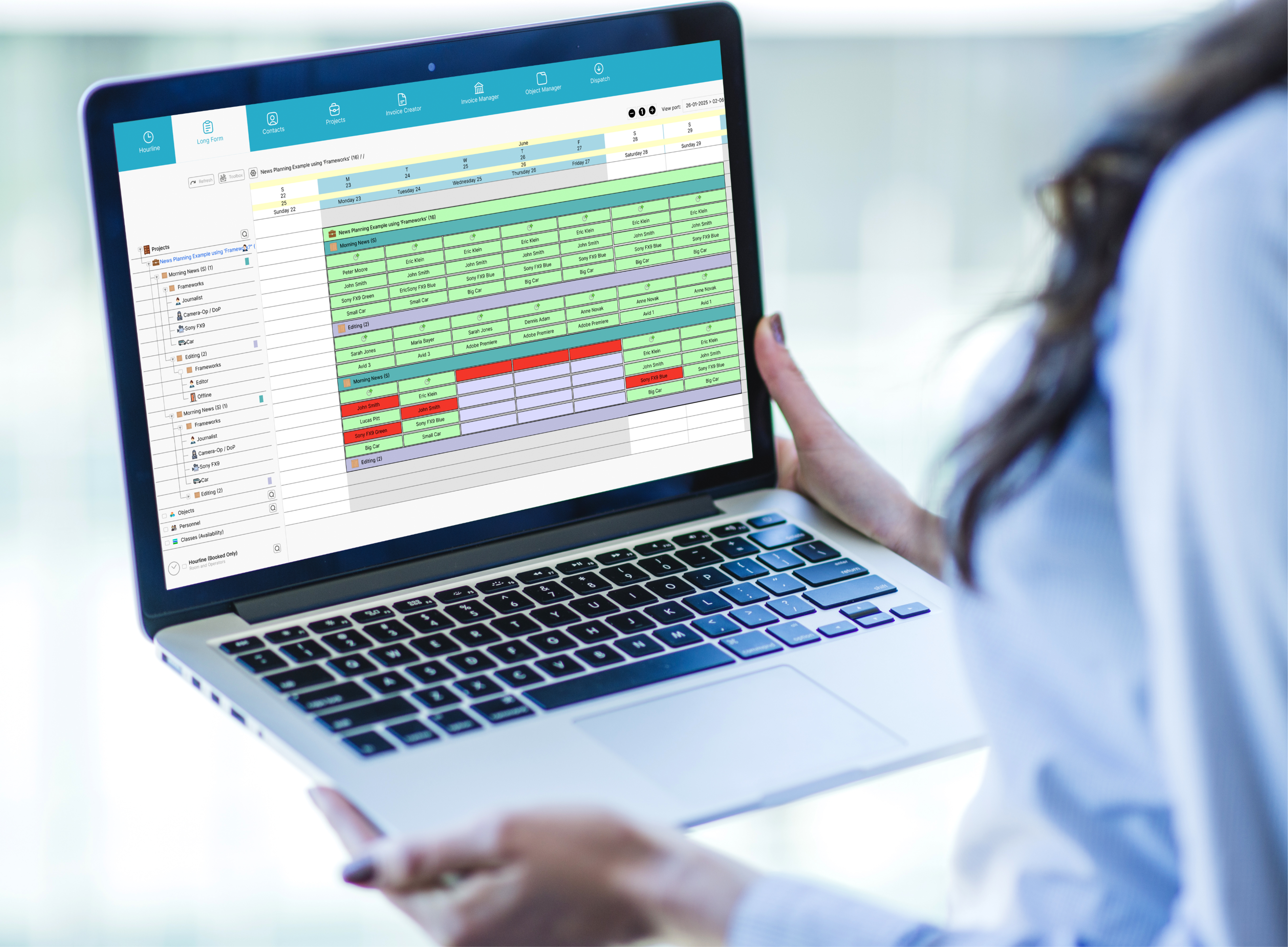
Broadcast resource scheduling software helps broadcasters plan and manage crew, equipment, studios and facilities in one place. It provides a clear overview of availability and bookings, making broadcast resource management easier across productions.
For example, a live broadcast may require studio space, camera operators, technical crew and equipment. Broadcast resource scheduling helps teams coordinate these resources, avoid overlapping bookings and keep production schedules organised.
Unlike playout scheduling, which manages what goes on air and when, broadcast scheduling focuses on the people and resources needed to produce content.
What key features should broadcast resource scheduling software have?
Not every broadcasting operation needs the same tools. A regional television station may have different requirements from a national broadcaster managing multiple studios, live events and production locations.
However, effective broadcast scheduling software should provide clear resource visibility, reliable booking controls and a practical way to handle changes.
The following features are worth prioritising.
Centralised resource availability and booking
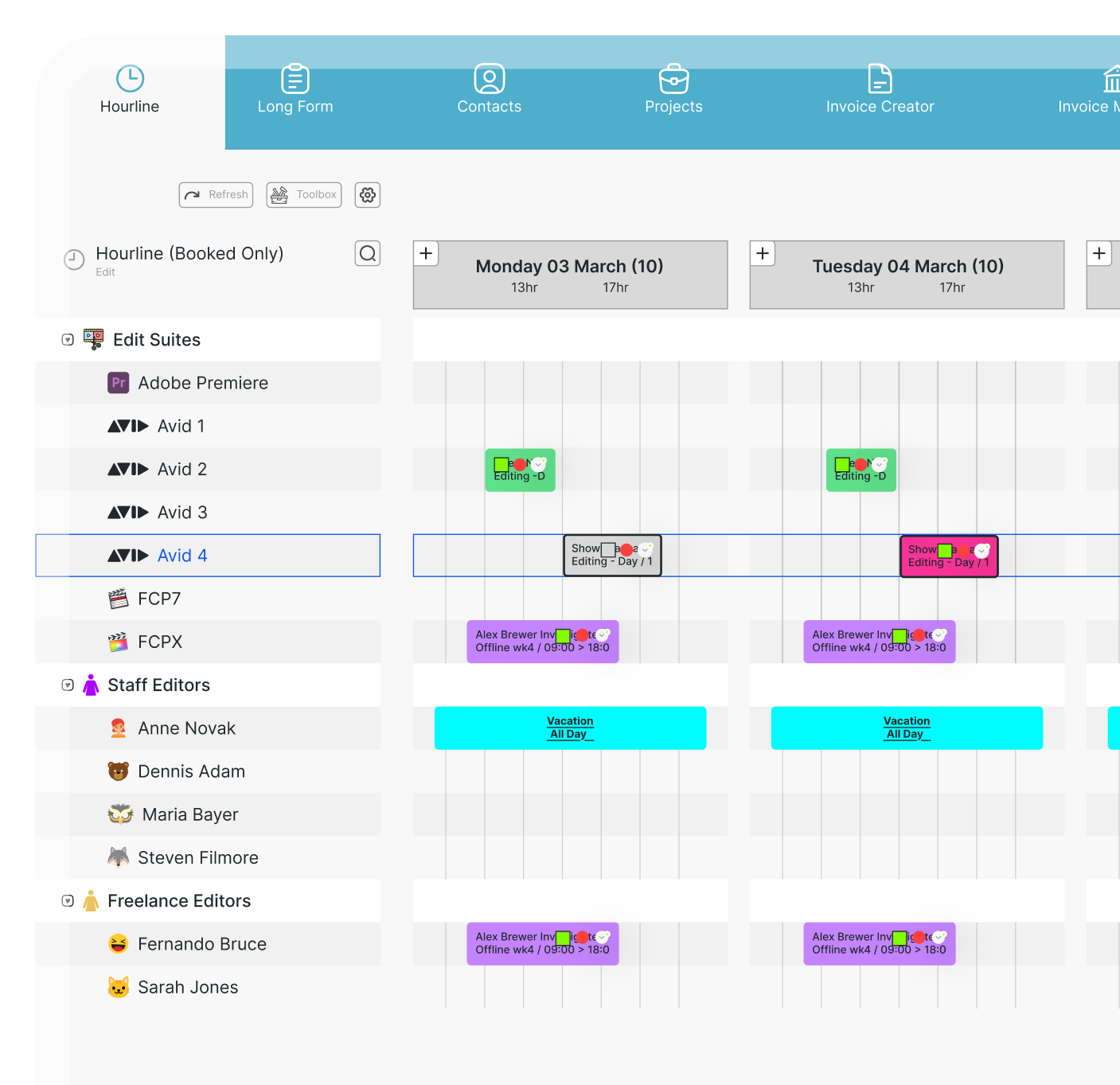
Centralised scheduling gives broadcasters a clear view of crew, equipment, studios and facility availability in one place. With resource scheduling software, teams can easily:
- Check studio, control room and edit suite availability.
- View crew, equipment and technical staff bookings.
- Track confirmed and provisional reservations.
- Identify overlapping bookings across productions and locations.
For example, if two programmes need the same studio, schedulers can quickly spot the conflict and find an alternative without checking multiple calendars or spreadsheets.
Crew scheduling and personnel management
Broadcast crew scheduling involves coordinating permanent staff, freelancers and technical specialists across different productions and shifts.
A good scheduling system should help teams:
- Check crew availability, skills, leave and existing bookings.
- Manage shifts, working hours and overtime.
- Reassign staff quickly when last-minute changes occur.
- Avoid scheduling conflicts across productions.
For example, if a camera operator becomes unavailable, coordinators can find a qualified replacement, check their availability and update the schedule without creating new conflicts. Local working-time regulations and rest requirements should also be considered.
Conflict detection and schedule updates
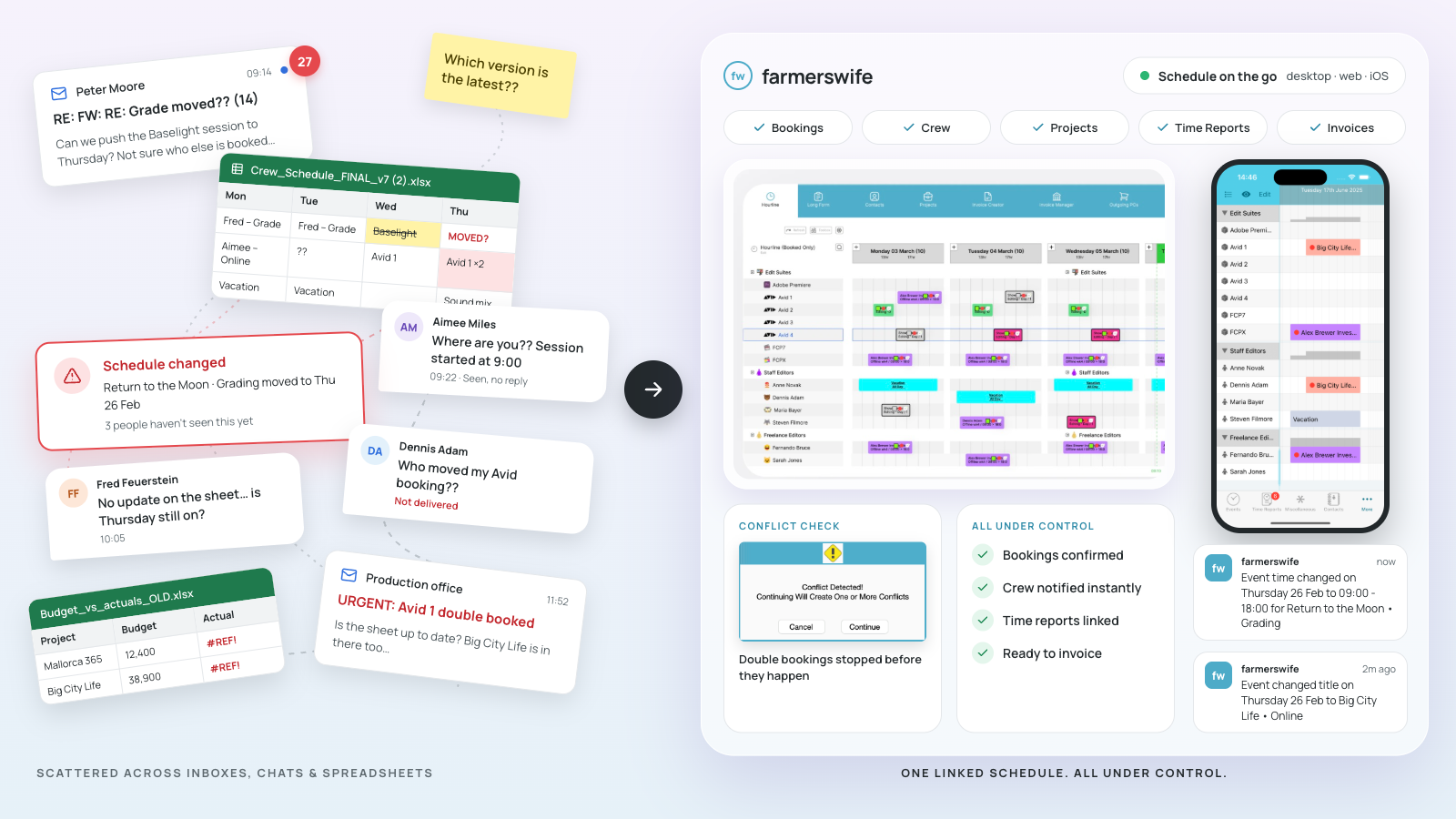
Effective broadcast scheduling software should help teams detect overlapping bookings, manage last-minute changes and keep everyone informed.
Key capabilities include:
- Conflict warnings for double-booked resources.
- Easy adjustments to booking times and resource allocation.
- Clear schedule updates and timely notifications for affected teams.
For example, if a live broadcast overruns its studio booking, the scheduler should identify conflicts, help teams review alternatives and update the schedule. Detecting conflicts doesn't mean automatically resolving them. Teams may still need to reassign resources and communicate changes to affected crew and departments.
Budgeting, time reporting and cost tracking
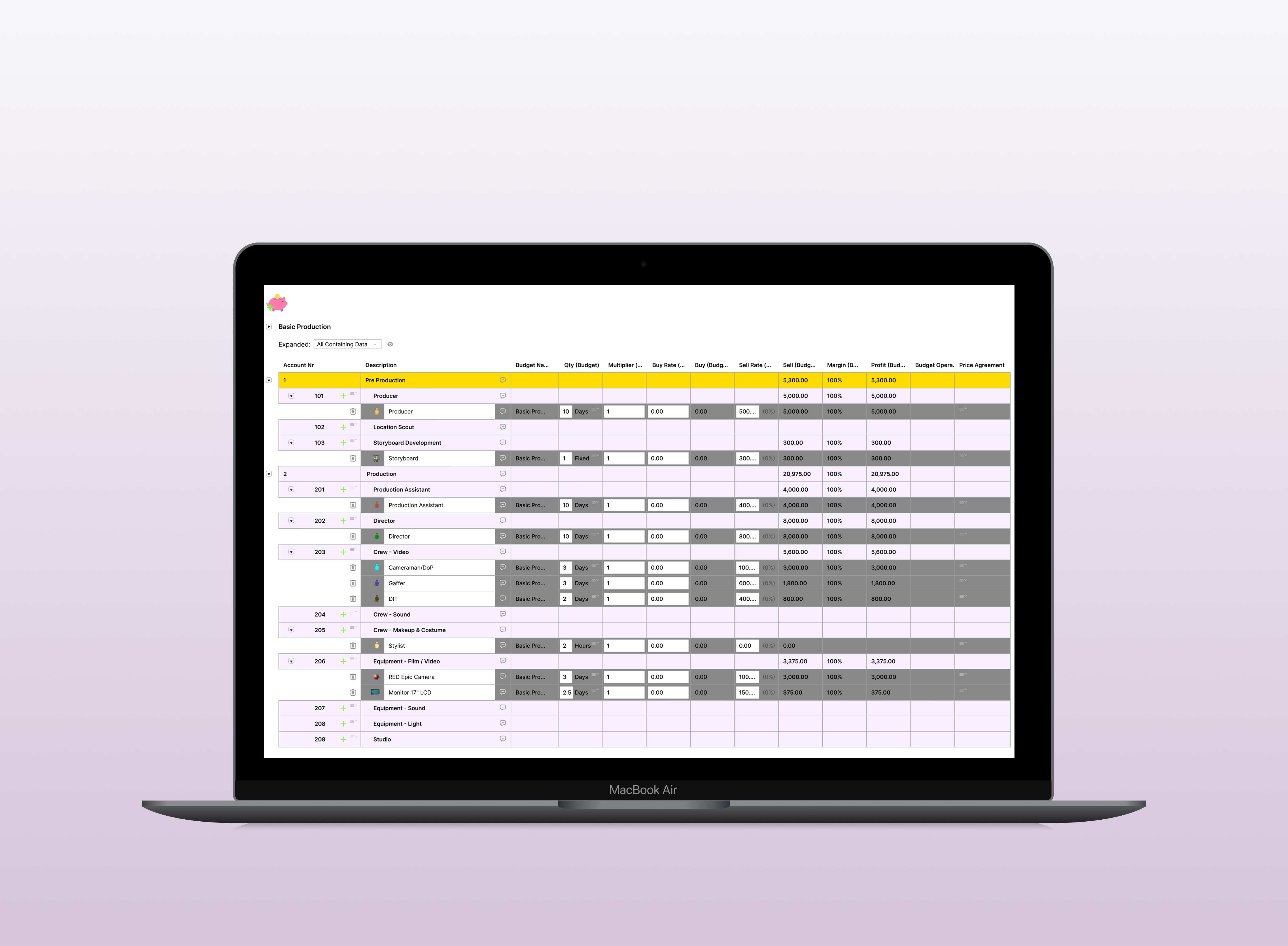
Broadcast scheduling decisions directly affect production costs. Extra studio time, equipment bookings or crew overtime can quickly impact budgets. Broadcast scheduling software with budgeting and time reporting should help teams:
- Track resource rates and estimated booking costs.
- Compare planned versus actual time and expenses.
- Monitor budget changes when schedules are adjusted.
For example, if a production requires two additional studio hours, managers can review the extra crew and facility costs before confirming the change, helping them make more informed financial decisions.
Resource utilisation and reporting
Broadcast resource management software should provide reporting on resource availability, utilisation, booked hours and staff workloads to help teams plan more effectively.
For example, reports might show that one edit suite is fully booked while another has spare capacity, or highlight recurring crew overtime.
These insights help broadcasters optimise resource allocation, identify scheduling bottlenecks and make better decisions about future productions, equipment and staffing.
How do you evaluate broadcast scheduling software before buying?
A feature list can tell you what a platform claims to offer. It doesn't necessarily show how well that platform will work in your production environment.
When evaluating broadcast scheduling software, the best approach is to combine clear requirements with realistic demonstrations and a consistent comparison process.
Rather than asking vendors to show everything their software can do, ask them to demonstrate the workflows your team performs every day.
Define your operational requirements
Before choosing broadcast scheduling software, identify your biggest scheduling challenges and the resources you need to manage, from studios and equipment to crew and multiple production locations.
Ask yourself:
- How many productions and shared resources do we manage?
- Do we need to schedule freelancers, shifts and last-minute changes?
- Should bookings connect with budgets and existing systems?
Separate must-have features from nice-to-haves, and involve your schedulers, production coordinators and operations managers in the decision. They're the ones who know what works, and what doesn't, in daily production.
Test realistic broadcast scheduling scenarios
A good software demonstration should show how the platform handles actual production challenges, not just a perfectly organised calendar.
Ask each vendor to work through the same situations.
Scenario 1: A double-booked studio
Two production teams request the same studio at overlapping times. Can the scheduler see the conflict, identify an alternative and update the booking?
Scenario 2: An unavailable crew member
A sound engineer becomes unavailable on the morning of a production. Can the coordinator find a suitable replacement, check their availability and update the assignment?
Scenario 3: A late-running live broadcast
A programme overruns its scheduled slot. Can the team extend its booking, identify affected resources and communicate the revised schedule?
Scenario 4: A booking that changes the budget
An additional studio session requires more crew and equipment time. Can the production manager assess the additional costs before confirming the change?
For every scenario, ask the vendor to show the complete workflow, from identifying the issue to updating the booking and making the change visible to relevant users.
This approach reveals much more about operational suitability than watching isolated feature demonstrations.
Check usability, integrations and room for growth
The best broadcast scheduling software should be easy to use, connect with your existing tools and grow alongside your operation.
When comparing solutions, consider:
Broadcast scheduling software evaluation checklist
Once you've shortlisted vendors, use a simple scorecard to compare their features, usability and suitability for your broadcast operation.
The checklist below covers key broadcast resource management requirements, from crew and equipment booking to financial tracking. If your workflows also involve editing and finishing, consider the specific needs of post-production scheduling software.
|
Criterion |
Demo question |
Priority / Score |
|
Resource availability |
Can we see available studios, equipment and crew in one place? |
1–5 |
|
Conflict detection |
Does the system identify overlapping bookings and help us review alternatives? |
1–5 |
|
Personnel planning |
Can we manage staff availability, shifts, freelancers and replacements? |
1–5 |
|
Financial tracking |
Can we compare planned bookings, resource costs and actual time? |
1–5 |
|
Schedule communication |
How are changes made visible to affected users? |
1–5 |
|
Reporting |
Can we review utilisation, capacity and relevant time information? |
1–5 |
|
Integrations |
Does the platform connect with our existing systems? |
1–5 |
|
Scalability |
Can it accommodate additional productions, locations and resources? |
1–5 |
How to use the scorecard
Rate each criterion from 1 to 5 based on what the vendor actually demonstrates:
- 1: Doesn't meet the requirement.
- 2: Meets it only with major limitations.
- 3: Meets the basic requirement.
- 4: Meets the requirement effectively.
- 5: Meets the requirement very well, with a clear and practical workflow.
You can also assign higher priority to business-critical capabilities, such as conflict detection or crew scheduling, and apply weighting when comparing final scores. Remember that the best broadcast scheduling solution isn't necessarily the one with the highest unweighted total. It's the one that performs well against the requirements that matter most to your operation.
What should you consider beyond software features?
Choosing the right broadcast scheduling software goes beyond features. A smooth implementation, proper training and reliable support are just as important for long-term success.
Whether you're managing broadcast crew, equipment and studio scheduling or coordinating multiple productions, make sure the software fits your team's workflows, budget and future needs
Implementation, training and vendor support
Switching to new broadcast scheduling software should make your team's work easier, not more complicated. A smooth implementation starts with the right planning and support.
Before choosing a vendor, consider:
- Setup and migration: How are existing bookings, resources and user permissions transferred?
- Training and support: What onboarding, guidance and response times are offered?
- Pilot testing: Can your team test real workflows and validate imported data before going live?
A successful rollout means your schedulers feel confident using the system from day one, with reliable support as your operations grow.
Pricing and total cost of ownership
When comparing broadcast scheduling software, look beyond the initial price and consider the total cost of ownership.
Key costs to review include:
- Licensing: Subscriptions, user licences and additional users.
- Implementation: Setup, configuration, integrations and training.
- Ongoing costs: Support, maintenance and future expansion.
A lower upfront price doesn't always mean better value. Compare vendors over a defined period, such as three years, and check what's included to avoid unexpected costs. The goal is to find a solution that fits your budget and your production needs, both now and as you grow.
Common mistakes when selecting broadcast scheduling software
Choosing a scheduling platform is a significant operational decision. Some common mistakes can make the process more difficult or lead to a system that doesn't fully meet the team's needs.
|
Mistake |
Consequence |
Better action |
|
Choosing on price alone |
Essential functionality or implementation costs may be overlooked. |
Compare total costs alongside operational suitability. |
|
Skipping realistic demonstrations |
Important workflow limitations may only appear after purchase. |
Test real production scenarios before deciding. |
|
Excluding daily schedulers |
The selected system may not reflect how teams actually work. |
Include coordinators and operational users in evaluations. |
|
Assuming integrations will work |
Unexpected technical work or additional costs may arise. |
Ask vendors to verify specific integration requirements. |
|
Overlooking implementation planning |
Migration problems and limited adoption may disrupt operations. |
Agree on a phased rollout, training and validation plan. |
A structured selection process helps avoid these problems and gives teams more confidence that their chosen system will support day-to-day broadcast operations.
How farmerswife supports broadcast resource scheduling
Built for the media and entertainment industry, farmerswife combines broadcast resource scheduling, crew management and production financials in one connected system. With over 25 years of industry experience, it helps broadcasters coordinate complex production workflows.
With farmerswife, teams can:
- Schedule resources: Manage crew, studios, equipment and facilities using drag-and-drop scheduling.
- Prevent double bookings: Check availability and identify scheduling conflicts.
- Manage personnel: Coordinate staff, freelancers, shifts, leave and overtime.
- Track time and costs: Compare planned and actual hours, manage budgets and monitor production expenses.
- Improve visibility: Use reporting tools to review resource utilisation and workloads.
For example, a broadcaster managing live news, studio recordings and multiple productions can view shared resources, adjust conflicting bookings and track associated costs from one system.
Want to see how farmerswife works for your team?
- Real-time visibility
- Scales with your workflow
- Keep your crew connected on iOS
- Catch budget overruns before they happen
- Plan with confidence
Conclusion
Choosing the right broadcast resource scheduling software starts with understanding how your operation actually works.
Whether you're coordinating one studio or managing multiple productions across different locations, the priority is finding a system that gives your team clear resource visibility, supports accurate bookings and makes unexpected changes easier to manage.
Look beyond feature lists. Test realistic scenarios, involve your scheduling teams, compare implementation requirements and assess long-term costs before making a decision.
The right solution should support your existing workflows while giving you room to grow.