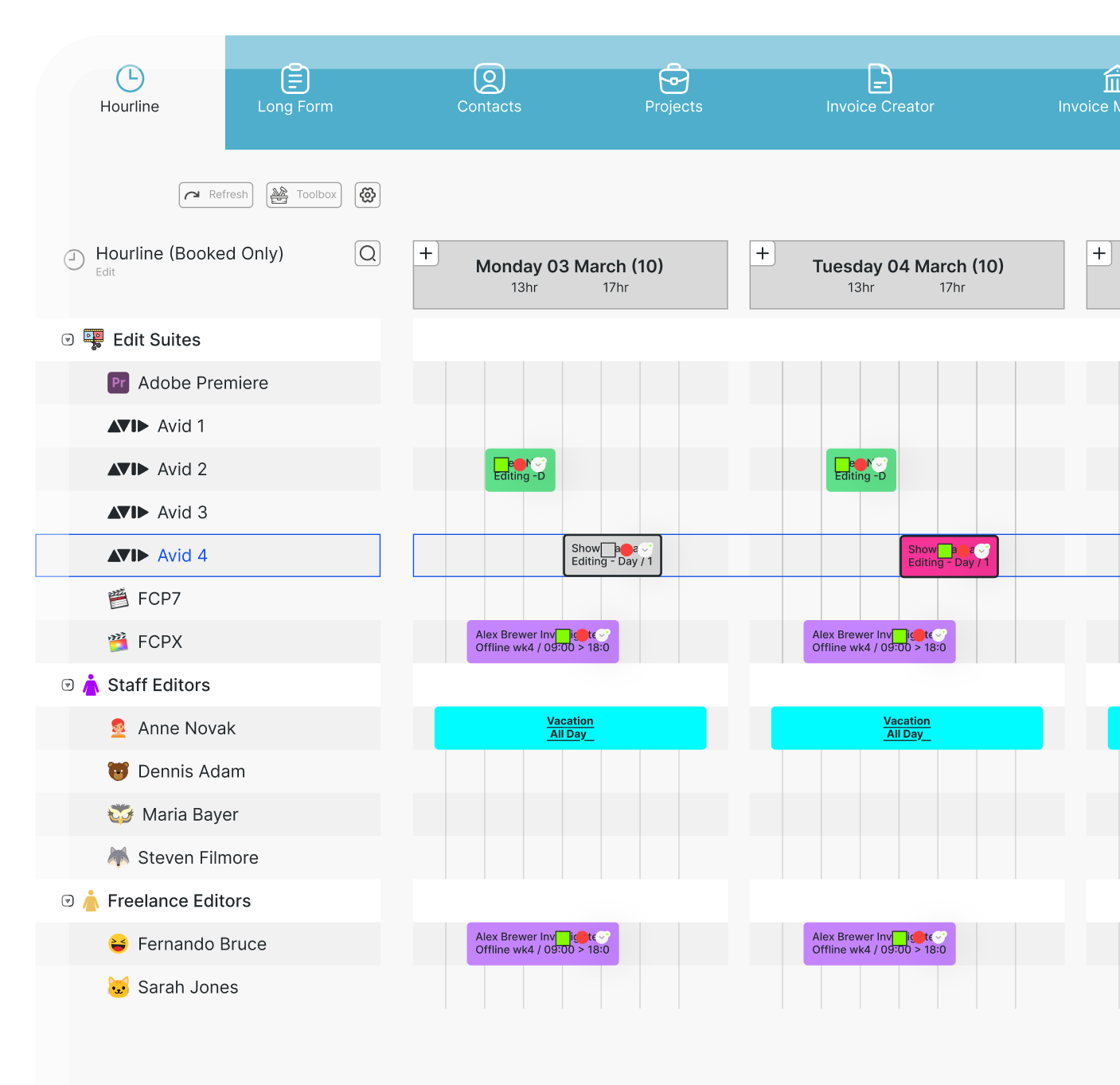
A crew member becomes unavailable, a studio session runs over, or equipment suddenly needs to be reassigned to another production. Drag and drop scheduling software for broadcast helps teams respond quickly by letting schedulers move, resize and reorganise bookings visually instead of rebuilding schedules manually.
In fast-moving broadcast environments, even a small scheduling change can affect crew, equipment, studios and other production activities. A visual drag-and-drop workflow makes it easier to adjust timings, reassign resources and keep the wider schedule up to date while maintaining visibility of availability and potential conflicts.
This guide focuses specifically on how drag-and-drop scheduling works in broadcast workflows, the problems it helps solve and the features that make it useful for busy production teams. It is not a comparison of the best broadcast scheduling tools.
What is drag-and-drop scheduling in broadcast production?
Drag-and-drop scheduling lets users move an existing booking or resource to a different time, date or position directly within a visual schedule. In broadcast production, that could mean rescheduling a studio recording, moving an edit session, changing a crew booking or adjusting when a camera kit is required. A basic drag-and-drop calendar makes moving time blocks simple. But broadcast scheduling usually involves much more than time alone. A single production booking may depend on:
- Producers and production teams
- Camera operators and technical crew
- Studios and control rooms
- Edit suites
- Cameras, lighting and audio equipment
- Other shared production resources
That is why drag-and-drop scheduling software becomes more useful when the visual schedule is connected to resource availability, booking information and potential conflicts.
Instead of asking only “Can I move this booking?” schedulers can also ask “Are the people, equipment and facilities I need actually available?”
Why drag-and-drop scheduling matters for broadcast teams
Multiple productions can be running simultaneously while sharing the same people, equipment, studios and facilities. When one booking changes, the impact can quickly spread across the wider schedule. Visual scheduling makes those changes easier to understand and act on.
It helps production teams adjust plans faster, reduce manual re-entry and maintain a clearer overview of how resources are being used across the organisation.
Adjusting schedules when production plans change
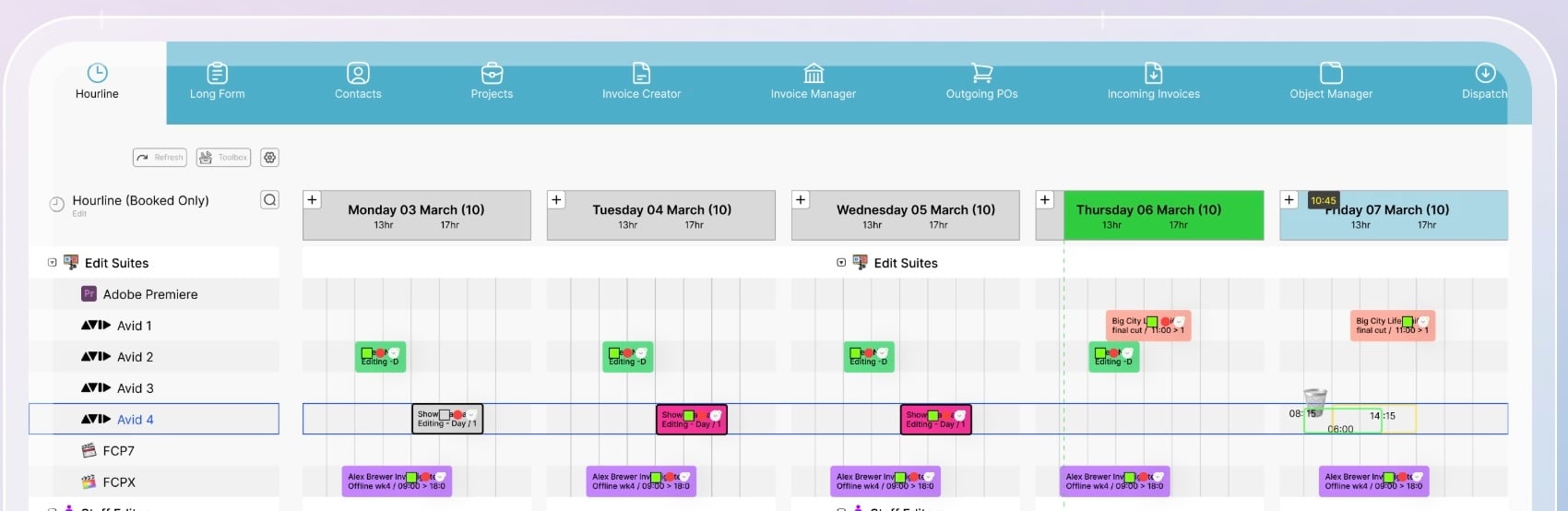
Production schedules change constantly. A shoot may run late, a contributor may only be available later in the day, or a studio session may need to move to another time slot. With drag-and-drop scheduling, the scheduler can move or resize the booking directly within the visual schedule instead of deleting it and rebuilding it elsewhere.
The benefit is faster schedule changes without losing visibility of the wider production plan. Adjusting one booking should not mean rebuilding the entire schedule from scratch.
Coordinating crews, equipment and studios
A broadcast booking is rarely just a time slot. A studio shoot might depend on camera operators, sound technicians, producers, cameras, lighting equipment and studio space all being available at the same time. When that booking moves, each of those connected resources needs to move with it or be checked for availability.
Visual scheduling helps teams see how crew availability, equipment bookings, studios and facilities are connected, making it easier to understand the impact of a schedule change before confirming it. For teams managing large numbers of shared resources, bringing broadcast crew, equipment and studio scheduling into the same operational view can make coordination much simpler..png?width=704&height=629&name=Screenshot%202025-10-02%20at%2014.00.15%20(2).png)
Keeping teams aligned after schedule changes
When schedules are managed through spreadsheets, email chains or chat messages, it is easy for outdated versions to remain in circulation. A producer may have the latest schedule while a crew member is still looking at yesterday's spreadsheet. Keeping production scheduling in one shared system gives producers, schedulers, operations teams and managers a common source of truth.
That becomes particularly important in live broadcast production, where timings can change quickly and teams need access to current scheduling information.
How does drag-and-drop scheduling work?
Drag-and-drop scheduling follows a simple visual workflow:
For example, if an edit session scheduled for Tuesday afternoon needs to move to Wednesday morning, the scheduler can reposition the booking directly within the production timeline. They can then check whether the assigned editor and edit suite are available at the new time and whether the change creates any conflicts with other work.
The visual interface makes the change quicker, while the surrounding scheduling information helps the team confirm whether the new plan actually works.
Moving and adjusting production bookings
Production bookings often need to move. A studio recording may start later, a rehearsal might change day, or an edit session may need to happen earlier. With visual scheduling, the scheduler can simply move the booking to a new date, time or position in the schedule.
For example, if a studio recording moves from the morning to the afternoon, the booking can be repositioned directly. At the same time, the scheduler should still be able to see the surrounding resource context, including crew availability, studio use and equipment bookings. This makes it easier to check that moving one booking does not create a new conflict somewhere else in the production schedule.
Changing timings and durations
Production bookings do not always take the time originally planned. An interview may run over, a studio session could finish early, or an edit may need extra time before delivery. With drag-and-drop scheduling, schedulers can extend, shorten or shift a booking directly within the visual schedule.
For example, if a studio session needs an extra hour, the booking can be extended while the scheduler checks what that change affects next. This could include the following studio booking, crew working hours, equipment availability or other production activities. The key is being able to adjust the timing quickly while still seeing the wider impact on the schedule.
Reassigning production resources
Sometimes the booking stays in place, but the resource needs to change. A crew member may be unavailable, a camera kit booked elsewhere, or a studio no longer suitable. Visual scheduling makes it easier to review alternatives and reassign the required crew, equipment or space while keeping the wider production schedule visible.
Drag-and-drop alone does not automatically check availability. The real value comes when it is supported by resource availability and conflict management features.
How visual scheduling helps prevent resource conflicts
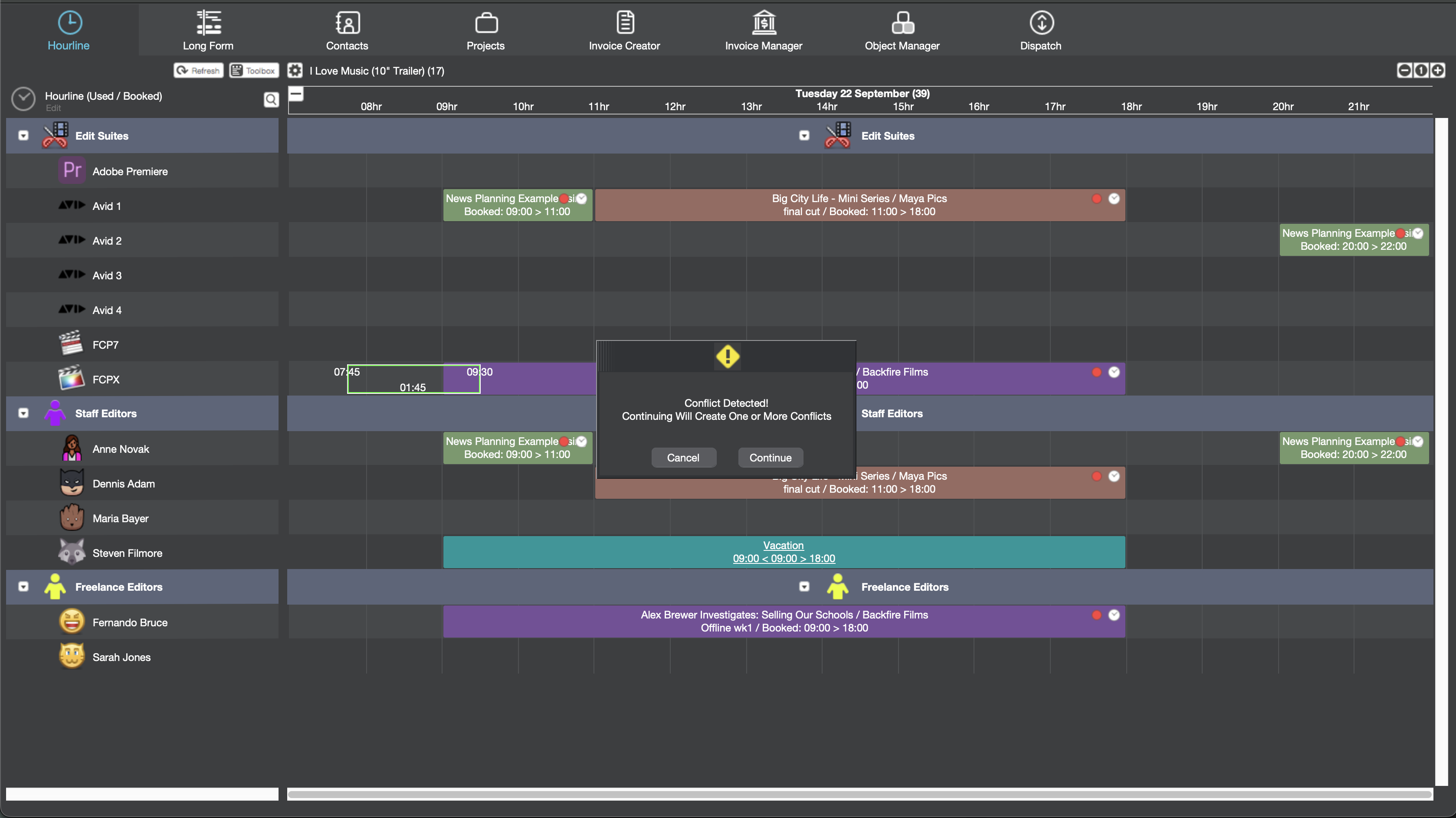
A key challenge in broadcast resource scheduling is avoiding overlapping bookings. The same studio, camera kit or crew member may be requested by two productions at the same time.
Visual scheduling makes these conflicts easier to spot. When the schedule is connected to resource availability and conflict information, teams can see whether crew, equipment and studios are free before confirming a change.
Conflict detection is a broader scheduling capability that complements drag-and-drop planning, helping teams confirm that a change works operationally as well as visually.
Drag-and-drop calendar vs. broadcast production scheduling software
A basic drag-and-drop calendar helps users move time blocks. Broadcast production scheduling software connects those time blocks with the people, equipment, facilities and production information required to deliver the work.
Teams evaluating a broader scheduling solution can also explore what to look for in cloud-based broadcast scheduling software.
What features should complement drag-and-drop scheduling?
Drag-and-drop is an interface feature, not the complete scheduling solution. For complex broadcast operations, visual production scheduling becomes much more valuable when teams can see availability, coordinate resources, manage conflicts and keep schedule changes visible across the organisation.
Resource availability
Before moving a booking, schedulers need to know whether the required crew, studios, equipment and facilities are available at the new time.
This might include camera operators, edit suites, cameras, audio or lighting equipment, and other shared production resources. When several productions use the same resources, seeing availability directly alongside the schedule helps teams compare options and make faster decisions. It also reduces the need to check separate calendars or spreadsheets before confirming a change.
Crew and equipment scheduling
Crew and equipment need to stay aligned with the production schedule. A shoot may depend on camera operators, lighting teams, camera kits and audio equipment all being available at the right time. If the production moves, schedulers need to check whether those crew roles, working hours and equipment bookings can move with it.
Using broadcast management software to manage people, equipment and production bookings together gives teams a clearer view of availability and helps keep resources coordinated as plans change.
Studio and facility scheduling
Studios, edit suites, control rooms and other production spaces are often shared across multiple productions, so occupancy needs to stay closely aligned with the schedule. Visual scheduling helps teams see when a space is in use, where free time is available and whether moving a booking could create an overlap.
For example, if a studio session moves by two hours, the scheduler can quickly check what is booked before and after it and avoid two activities relying on the same space at the same time.
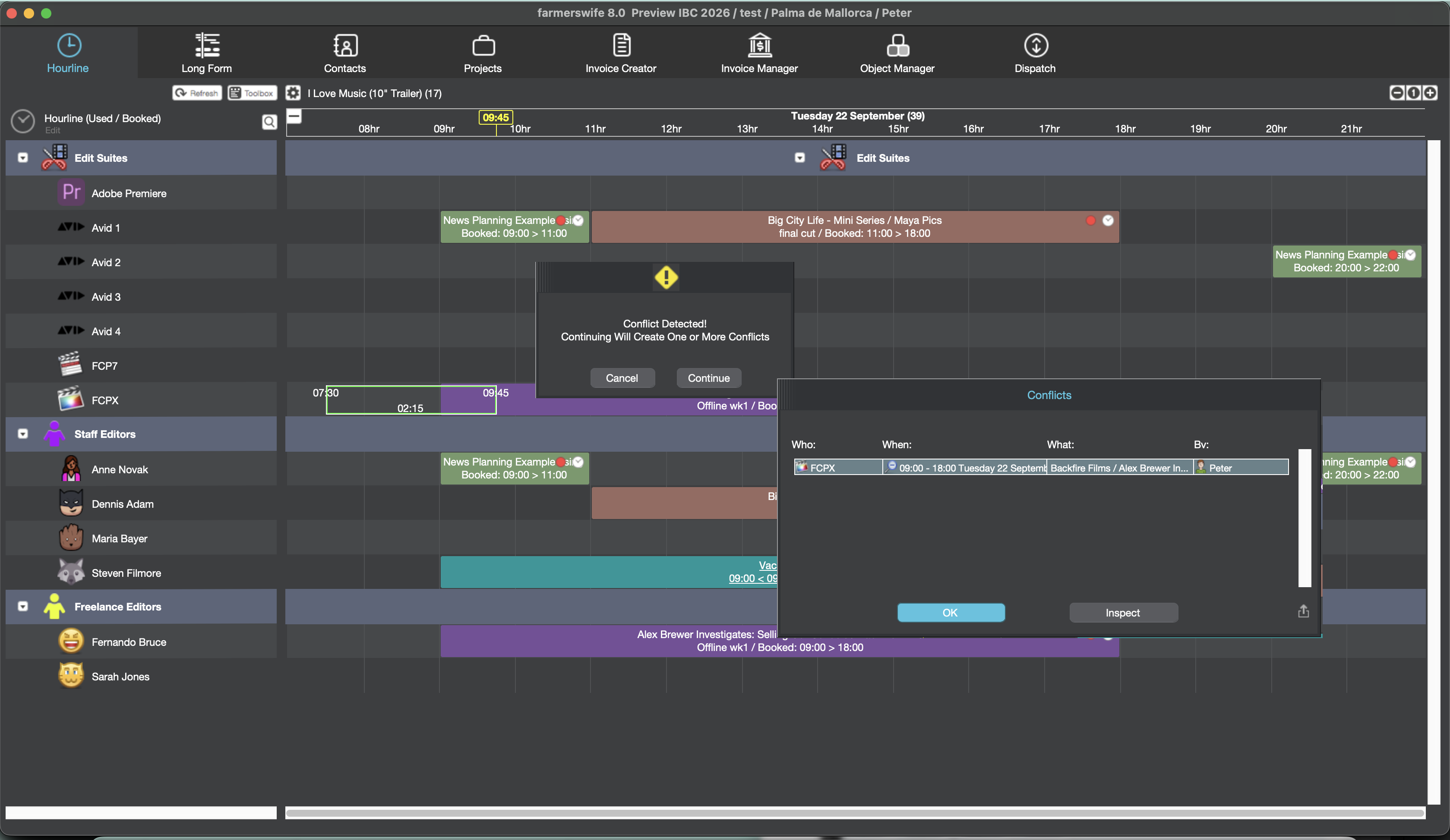
Conflict management
Scheduling software can help surface these conflicts so teams can review them before confirming a change. For example, a studio may be free at the new time, but the assigned camera crew could already be booked on another production.
The scheduler can then decide whether to move the booking again, reassign the crew or choose another available resource.
Real-time schedule updates
In live and fast-moving broadcast production, schedule changes need to reach the wider team quickly. When updates are reflected in one shared schedule, everyone can work from the latest information instead of relying on separate spreadsheets, messages or calendars.
This is especially important when several departments depend on the same plan throughout the day. Live broadcast production software can help teams keep schedule changes visible and reduce the risk of people working from outdated information.
How farmerswife supports drag-and-drop broadcast scheduling
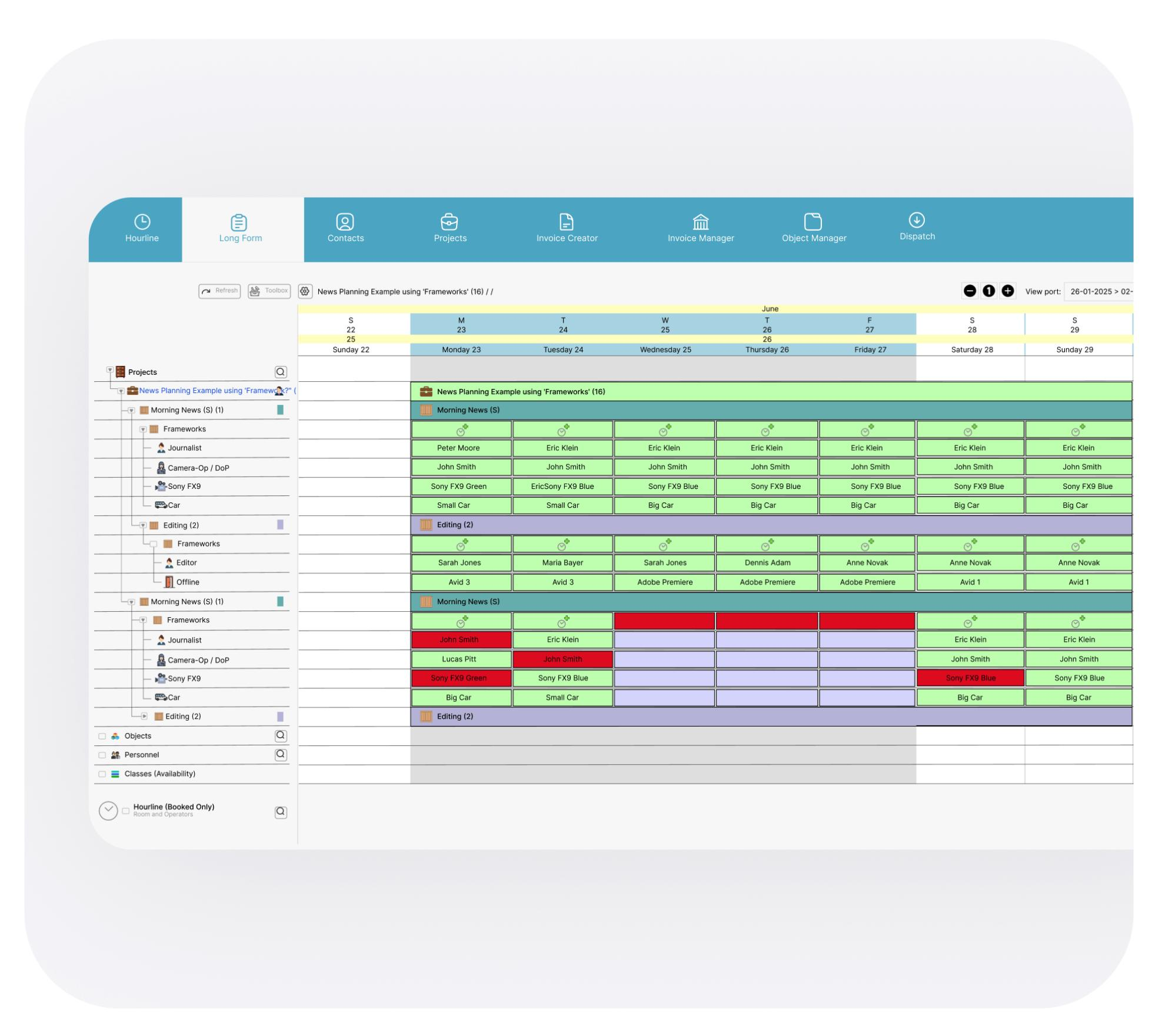
farmerswife combines visual scheduling with configurable timeline views and broadcast resource management, helping teams plan crew, equipment, studios and other shared resources in one schedule.
Bookings can be planned by hour, minute or day, giving schedulers flexibility to manage everything from short technical tasks to full-day production activities. If plans change, bookings can be moved or adjusted visually while availability and potential conflicts are reviewed.
For broadcasters managing complex operations, this helps connect day-to-day scheduling with the wider broadcast production management process, so teams can see how resources, bookings and production activity fit together.
Schedule changes can then stay visible to the wider team, reducing the risk of people working from outdated information.
When should broadcast teams use drag-and-drop scheduling?
Drag-and-drop scheduling is most useful when a production schedule has several moving parts and one change can affect multiple resources.
This is common for teams managing several productions at once, sharing crews, studios or equipment, dealing with frequent booking changes or trying to move away from spreadsheets and disconnected calendars. In these situations, visual scheduling makes it easier to adjust plans quickly while still seeing what else may be affected.
For a simple personal calendar, moving a booking from Monday to Tuesday is straightforward. In broadcast, that same change could affect crew availability, studio space, equipment bookings and other productions happening at the same time. That is why teams should evaluate drag-and-drop scheduling together with resource scheduling, availability visibility, conflict management and real-time updates.
Conclusion
Broadcast schedules change constantly, and drag-and-drop scheduling makes those changes easier to manage visually. Teams can move bookings, adjust timings and respond faster without rebuilding the schedule from scratch.
Its real value comes when those bookings stay connected to the wider production operation — including crew, equipment, studios, resource availability and potential conflicts. That gives schedulers the context they need to make changes without creating new problems elsewhere.
farmerswife brings these elements together through visual schvaleeduling, resource management and production planning, helping broadcast teams keep complex schedules clear and connected as plans change.
Curious about how this fits your workflow?
- Real-time visibility
- Scales with your workflow
- Keep your crew connected on iOS
- Catch budget overruns before they happen
- Plan with confidence